
How to Speed Up Content Approvals With Your Clients

For years I thought the hardest part of running an agency was creating the content. I was wrong. What really burned through my hours wasn’t designing or writing. It was waiting on client content approvals.
The “let me take a look and get back to you” that turns into three days of silence. Feedback that shows up as a WhatsApp voice note at eleven at night. The post that’s already scheduled and has to be pulled because the client changed their mind. When you manage multiple brands at once, this bottleneck doesn’t just add up. It multiplies. Five clients with five messy approval processes means five fires burning at the same time.
After a lot of trial and error, I put together a process that cut my revision rounds almost in half. It’s built on something simple, changing the way I ask for approval. Here it is, exactly how I use it.
Why Do Client Approvals Get Stuck?
Before you can fix it, you need to understand why it happens. In my experience, it almost always comes down to one of these four things:
- There’s no single place to approve. The design goes by email, the copy by WhatsApp, and the edits as a comment in Drive. Nobody knows which version is final.
- The feedback is vague. “I’m not sold on it,” “make it more modern,” “it’s missing something.” With instructions like that, every piece needs another round just to guess what the client wanted.
- There are no ground rules. Nobody ever agreed on how quickly the client should respond, how many rounds of changes the service includes, or who has the final say.
- Approvals happen one post at a time. Send a post, wait, send another, wait. Every send is a point of friction, multiplied by the number of posts.
None of these causes is “the client is difficult.” They’re process failures, and the process is something you control.

5 Steps to Speed Up Content Approvals
1. Keep All Approvals in One Place
My number one rule is that everything that gets approved, gets approved in the same place. It doesn’t matter which tool (a shared content calendar, a board, whatever platform you use), as long as it’s the only place where the client views, comments on, and approves content.
The day I stopped accepting approvals by WhatsApp voice note, my work changed. If the feedback isn’t in the system, it doesn’t count. It sounds rigid, but it’s what protects you from “but I told you…”
And of course, I have to recommend Portal Orange (full disclosure, I might be a little biased 😅). Your clients approve content and leave their comments in one place, with no more WhatsApp voice notes at eleven at night. The best part? Users are free, so you can add your clients to each brand to review and approve without paying extra for each one.
2. Approve Content in Batches, Not One Post at a Time
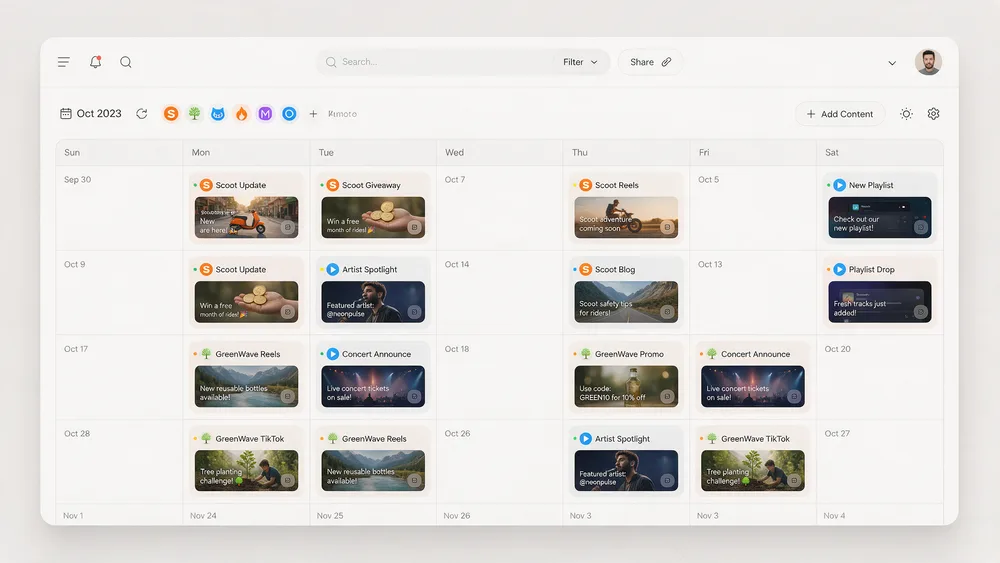
Instead of chasing approval on every post, I present the whole month at once. If you’re still building that calendar, here’s how to build a content calendar for multiple clients. The client logs in once, reviews the entire calendar in context, and approves it in one go.
You go from twenty micro-interruptions a month to a single review session. And clients approve with more confidence, because they see the full strategy instead of isolated pieces.
3. Agree on Deadlines and Revision Rounds During Onboarding
This gets settled on day one, not when there’s already a fire. In my onboarding, I put three things in writing:
- Response time. The client has a set number of business days to review. If they don’t respond, the content goes out as is or the calendar shifts, and that’s in writing too.
- Included rounds. The service includes, for example, two rounds of changes. From the third on, it’s billed. Endless rounds come from the lack of a clear limit.
- Who approves. One person with the final say. The worst-case scenario is content approved by the community manager and then vetoed by the owner. One final approver, always.
4. Present Each Piece With Its Goal
A client who sees a standalone image gives an opinion about the image. A client who understands what that piece is supposed to achieve gives an opinion about whether it achieves it. The difference is huge.
I include one line of context with each batch, like “this week we’re going for saves with educational content, so the tone is more practical and less promotional.” With that, feedback stops revolving around personal taste, which is exactly what generates the most rounds.
5. Ask for Structured Feedback: Approved, Changes, or Rejected
I ask clients to always respond with one of three options:
- Approved. It gets scheduled.
- Specific changes. With concrete instructions, like “swap photo 2” or “the price is $5, not $6.”
- Rejected, with a reason. What isn’t working and why, so it doesn’t happen again.
When “make it better” stops being a valid answer, revision rounds drop off a cliff. Not because the client thinks differently, but because you gave them a format to organize what they want.
A client approves quickly when deciding feels easy. The whole process is designed around that.
Which Approval Metrics to Track
What doesn’t get measured doesn’t improve. I track two simple numbers per client:
- Average rounds per piece. If a client is at three or four rounds, that’s a leak in your time and your margins.
- Days from “sent” to “approved.” It tells you which client is your real bottleneck.
With those two numbers, you stop feeling like “this client is a pain” and start seeing exactly which step things get stuck at, which is almost always something in the process you can adjust.
My Final Advice
The back-and-forth of approvals isn’t fixed by working faster or chasing clients. It’s fixed with process, meaning one place to approve, batch reviews, clear rules from day one, context for every piece, and structured feedback.
If you manage multiple brands, start with what’s cheapest to implement and hurts the most. Stop accepting approvals outside your system. That alone will make a difference in the first week.
